Two PDFs side by side,
scrolling together
A fast, fully native Windows viewer for reading two documents in parallel: a translation next to its original, two revisions of the same text, a paper and its appendix. The panes stay aligned even when the documents differ in length, page format and zoom, and a third pane is one menu entry away.
Windows 10 or 11, x64 or ARM64. Windows on ARM gets its own native build: ARM64 installer · ARM64 portable ZIP. Free software under the GPLv3 · source code and all releases on GitHub
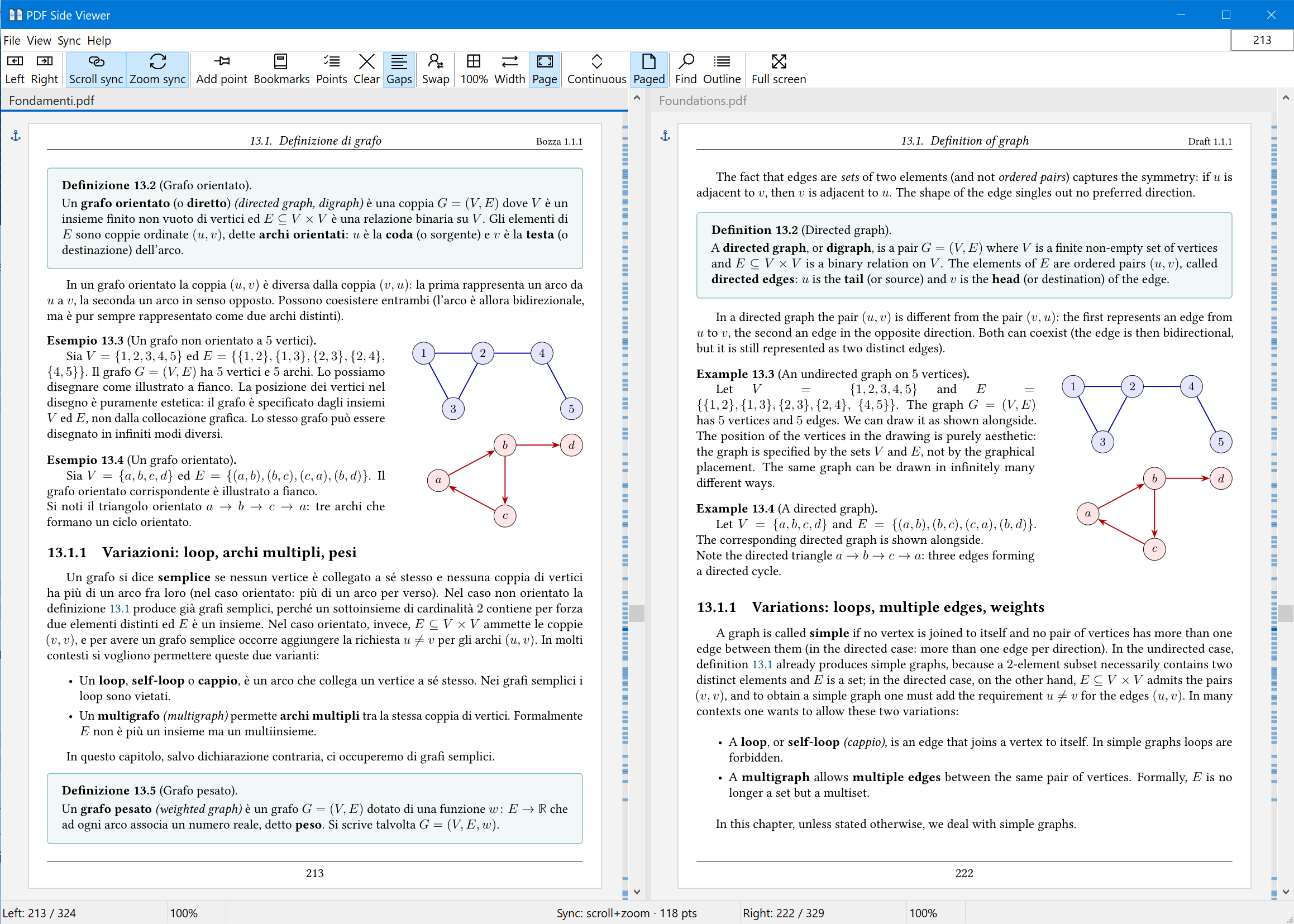
Synchronized scrolling that survives real documents
Side-by-side viewers usually pair the two documents by pixel offset or by a fixed page difference. That falls apart as soon as the documents are not twins: a translation runs longer than its original, a revision adds a chapter, one file is A4 and the other is Letter.
Here positions are exchanged in page units, never in pixels, and the pairing is an anchor you set yourself: pre-scroll each pane to matching content, lock, done. Zoom each pane however you like, the alignment holds.
Adjust without losing the lock
Hold Alt and scroll to nudge one pane alone; the anchor is recaptured where you leave it.
Sync points, like WinMerge
Pin whole-page pairs ("page 5 left = page 4 right"). Between two points the panes move page for page.
Alignment gaps
Where one document has extra pages, the other shows an empty gap, so both panes keep scrolling one to one instead of drifting.
Points from bookmarks
Numbered outlines present in every open file become sync points automatically, matching headings across fourteen languages; lettered appendices pair by their letter, unnumbered bookmarks by title.
Zoom in step, if you want it
Scroll sync is one lock, zoom sync another: turn it on and both panes stay at the same magnification, leave it off and each pane keeps its own.
The anchors are visible
A page carrying a sync point is flagged next to the page, and ticks along the right edge show where the points sit in the document: solid for the ones you set, faded for those derived from bookmarks.
A third document, when the comparison needs one
Two panes is the default and stays the default. When one more document belongs in the comparison, a menu entry adds a third pane between the other two, and opening a file into the centre switches to it on the spot. Each pane keeps its own splitter, its own view state and its own page and zoom cell in the status bar; going back to two panes closes the centre document and remembers it for the next switch.
Sync points work across all three. Generated from bookmarks, they keep only the headings that every open document shares, so a third edition can narrow the map but never distort it. F8 swaps the two panes along with their view states; with three panes it rotates them instead, and the sync points are permuted with the documents.
Drop two or three files on the window to fill the panes at once, double-click an empty pane to open a file there, or pass the paths on the command line: the argument order is Beyond Compare's, so the third file is the centre one and a third argument turns the mode on.
Built for LaTeX work
Auto-reload: when a build rewrites a PDF on disk, the viewer reloads it in place and keeps position, zoom and sync. Recompile and just look up.
SyncTeX, both directions: Ctrl+click a spot in the PDF to open the
matching source line in your editor (VS Code out of the box, any editor via a template),
and a forward search from the editor scrolls the right pane to the target and flashes it.
Each pane queries its own .synctex.gz, so a bilingual pair, or a trio, gets
independent search in every pane.
Inverse search launches a command taken from a plain configuration file, which any process of the same user can write. Running it from an elevated viewer would therefore raise that command to high integrity, so the viewer declines and says why: a per-user application has no reason to be elevated in the first place.
A complete viewer in each pane
Reading
Continuous scrolling, or one page at a time: with the whole page in view a wheel notch flips it, zoomed in it scrolls to the edge of the page first, and synced panes flip together. Fit width, fit page, tiled rendering crisp to 800%, per-monitor DPI awareness.
Finding
Full-document text search with live highlighting, clickable links, a width-adjustable outline sidebar, go to page by number or by the document's own labels, which the status bar and the scrollbar tooltip show as well.
Text
Mouse selection, double-click for a word, Ctrl+C copies proper Unicode text.
Chrome that gets out of the way
Menu and toolbar share one row, movable Internet Explorer style with text labels below the icons, beside them or off; full screen; optional pane headers showing the file name or the full path, the active one underlined in the accent colour.
Picks up where you left off
Session restore, recent files and recent sessions of two or three documents that reopen with their layout, sync points remembered for each set of documents.
Fourteen languages
English, Italian, German, French, Hungarian, Ukrainian, Romanian, Portuguese, Greek, Spanish, Polish, Dutch, Czech, Swedish.
What it starts with is up to you: the Options dialog covers the pane count and the defaults for new documents, the anchor marks and the scrollbar ticks, the pane header, what stays visible in full screen, the wheel-scroll step, the SyncTeX command and the Explorer entry.
Native, and it shows
Pure Win32 and Direct2D, rendered by MuPDF, statically linked. No .NET, no Electron, no browser engine: one self-contained executable of about 25 MB that opens instantly. The portable ZIP needs no installation at all, and the installer runs per-user without administrator rights.
The optional Explorer entry ("Open left/right/centre in PDF Side Viewer" on PDF files)
is off by default and registered per user under SystemFileAssociations,
so PDF Side Viewer can never take over as your default PDF handler.